FlightWall - Widescreen Flight Tracking LED Display

FlightWall - Widescreen Flight Tracking LED Display

A Live Display of the Aircraft Around You
★★★★★
4.5
(14 Reviews)
VERIFIED BUYERS
Skip to product information
1 of 3

FlightWall - Widescreen Flight Tracking LED Display

FlightWall - Widescreen Flight Tracking LED Display

A Live Display of the Aircraft Around You
★★★★★
4.5
(14 Reviews)
VERIFIED BUYERS
Regular price $499.00
Regular price Sale price $499.00
Sale Sold out
FREE SHIPPING
NO SUBSCRIPTION REQUIRED
Shop safely

Secure your shopping experience with various safe and trusted payment methods.

  • American Express
  • Apple Pay
  • Bancontact
  • Diners Club
  • Discover
  • Google Pay
  • iDEAL Wero
  • Mastercard
  • PayPal
  • Shop Pay
  • Visa

In stock:
Ships in 2–5 business days.

View full details
FlightWall - Widescreen Flight Tracking LED Display
FlightWall - Widescreen Flight Tracking LED Display $499.00

Unboxing & overview

Real-time flight tracking.
On your wall.

The FlightWall Mini is a compact LED display that shows live flights overhead — updated every 30 seconds, powered by Wi-Fi, and set up in minutes via the app.

What's in the box

  • FlightWall Mini display unit
  • USB-C power cable
  • Wall mount bracket
  • Mounting screws & anchors
  • Quick start guide
  • Magnetic rear stand

Technical specs

Display
64 × 32 RGB LED matrix
Connectivity
Wi-Fi 2.4 GHz
Power
5V via USB-C
Dimensions
256 × 128 × 30 mm
Refresh rate
Every 30 seconds
Brightness
Adjustable, 8 levels
App
iOS & Android
Data source
ADS-B live feed

FlightWall Mini — full unboxing walkthrough

Mobile App

The FlightWall App

Set up your FlightWall — choose your location, aircraft filters, and display layout. See live air traffic around you from your phone.

Free to download · iOS & Android

Free to download · iOS & Android

Community

Real Setups. Real Passion.
Real Aviation Love.

Our customers have taken their FlightWalls to the next level — installing them in some truly incredible spaces around the world. From cozy home cockpits to full-blown aviation-themed rooms, every setup reflects a deep passion for flight and design.

We post the best setups on social media — check them out below.

Community Setups

FlightWall

Bay Area, California

Founders

The people behind it

Meet the Creators

Aaren and Alex are two engineers / friends from the Bay Area, California. After their first FlightWall prototype went viral online, they decided to turn it into a real product.

Aaren grew up fascinated by aviation through his uncle who piloted commercial planes and sea planes.

Alex found a passion early for building and flying drones and studied aerospace engineering.

FAQs

Everything You Want to Know.
Answered.

Quick answers to the most common questions about TheFlightWall.

FlightWall connects to your WiFi and displays live aircraft data — commercial flights, private jets, helicopters, and more. Use Flight Tracking Mode to follow a specific flight by number, callsign, or tail number, or Area Tracking Mode to watch everything flying nearby within a custom radius or shape. Updates every 10 seconds in real time.

Damaged or defective items: free returns within 30 days with a prepaid label — choose a full refund or replacement. Change of mind: accepted within 10 days of delivery in original packaging; return shipping is the customer's responsibility. Email contact@theflightwall.com to start a return.

FlightWall only supports 2.4 GHz WiFi. If your router broadcasts only 5 GHz, contact your provider to split off a 2.4 GHz band — most modern routers support this. A mobile hotspot also works great and is a good way to test connectivity first.

Yes. Multiple people can connect via the FlightWall app — scan the QR code shown during setup or connect manually using the device ID. All connected devices can view and adjust settings from any network, including cellular.

No subscription required. All data costs are included in the product price for the foreseeable future. We may introduce optional premium features over time, but the core live flight data will remain included.

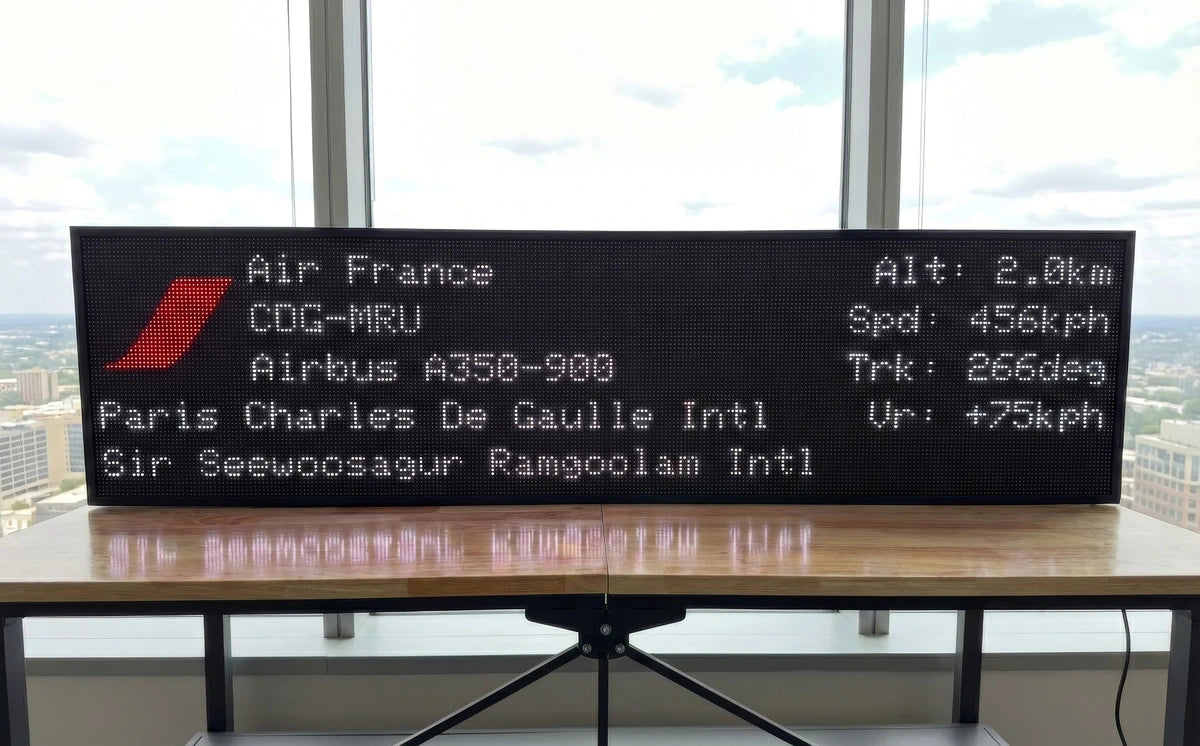
Alt = Altitude · Spd = Speed · Trk = Degrees from North (track heading) · Vr = Vertical Rate, whether the aircraft is climbing or descending. All metrics are configurable in the app under Display Layout settings.

Both the Mini and WideScreen display up to 5 flights at a time. If there are more aircraft in your area than can be shown, a notice will appear on screen. You can refine your area or add altitude filters to narrow results.